ABHA Card Download – Get Your ABHA Health Card PDF Online
Want to download your ABHA Card online but facing issues like OTP errors or login problems? This guide explains all working methods, Aadhaar steps, and solutions to common issues so you can download your ABHA Health Card PDF easily.
ABHA Online Services
You can Create, download, update details and manage your ABHA (Health ID) easily.
🆔 ABHA Registration
Create your ABHA Health ID online.
🪪 ABHA e-KYC Process
Complete your ABHA e-KYC verification online.
🔁 Recover ABHA ID
Find or recover your ABHA ID easily.
📥 Download ABHA Card
Download your ABHA card instantly.
🔍 Check ABHA Status
Track your ABHA registration status.
✏ Update ABHA Details
Update your health ID information.
🏥 Link Health Records
Connect your health records with ABHA.
🔐 ABHA Login
Login to manage your ABHA account.
What is ABHA Card?
ABHA (Ayushman Bharat Health Account) is a 14-digit unique health ID that allows users to store and access their medical records digitally. It helps in sharing health data securely with hospitals and doctors with user consent.
This system makes healthcare more efficient by allowing users to share their medical data with hospitals and doctors with consent.
| Details | Information |
|---|---|
| Launched by: | National Health Authority (NHA), India |
| Scheme: | Ayushman Bharat Digital Mission |
| Launch Date: | 27 September 2021 |
| Beneficiaries: | All Indian citizens |
| Main Benefit: | Digital Health Record Management |
| Official Portal: | https://abha.abdm.gov.in |
How to Download ABHA Card & Print 4 Ways to Download ABHA Card Online
Downloading your ABHA Card is easy and can be done through multiple official platforms. Below are the four most reliable methods with step-by-step instructions so you can choose the one that suits you best.
1- Download From Official Website
This is the most direct and widely used method to download your ABHA Health Card PDF.
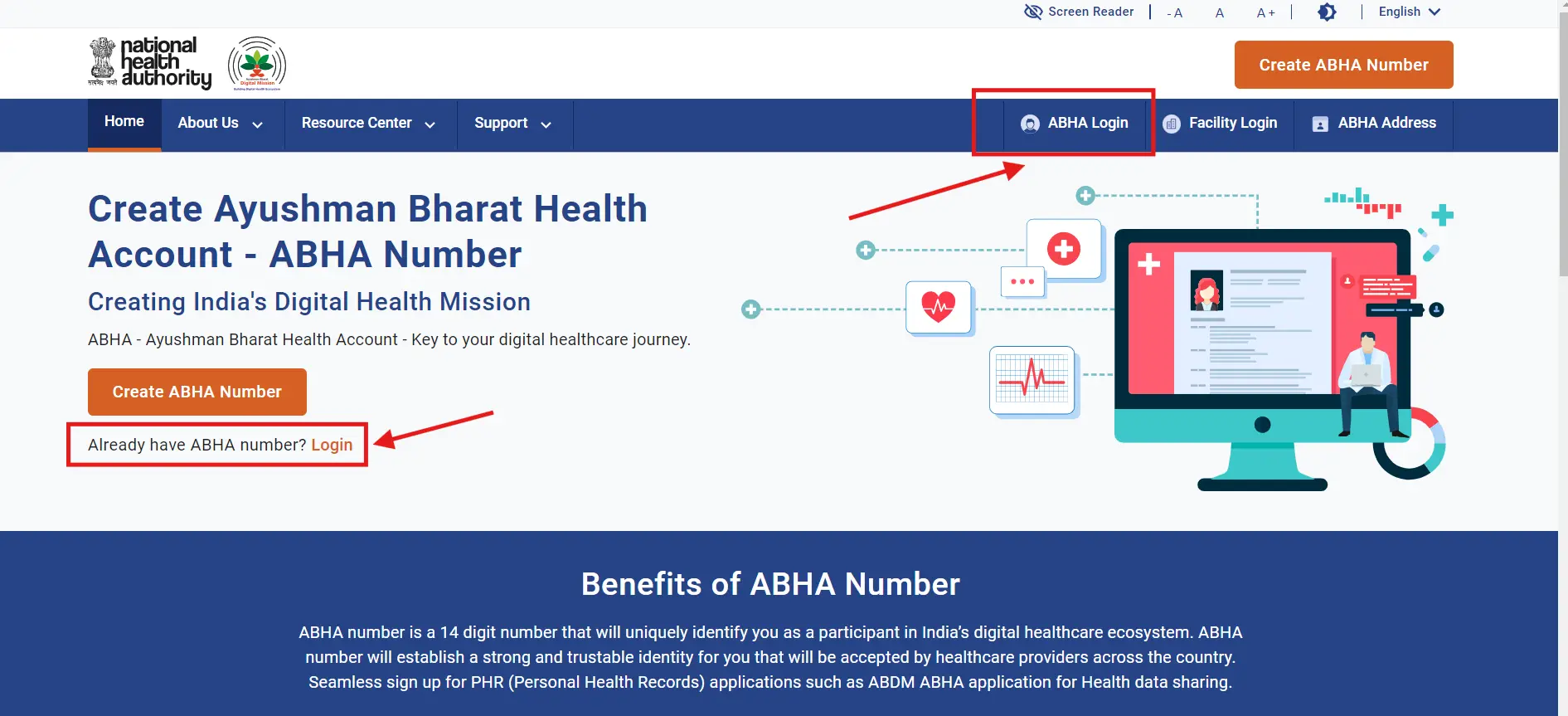
Step-1: Visit the official ABHA portal: https://abha.abdm.gov.in
Step-2: Click on “Login” or “ABHA Login”
Step-3: Choose login method:
- Mobile Number
- ABHA Number
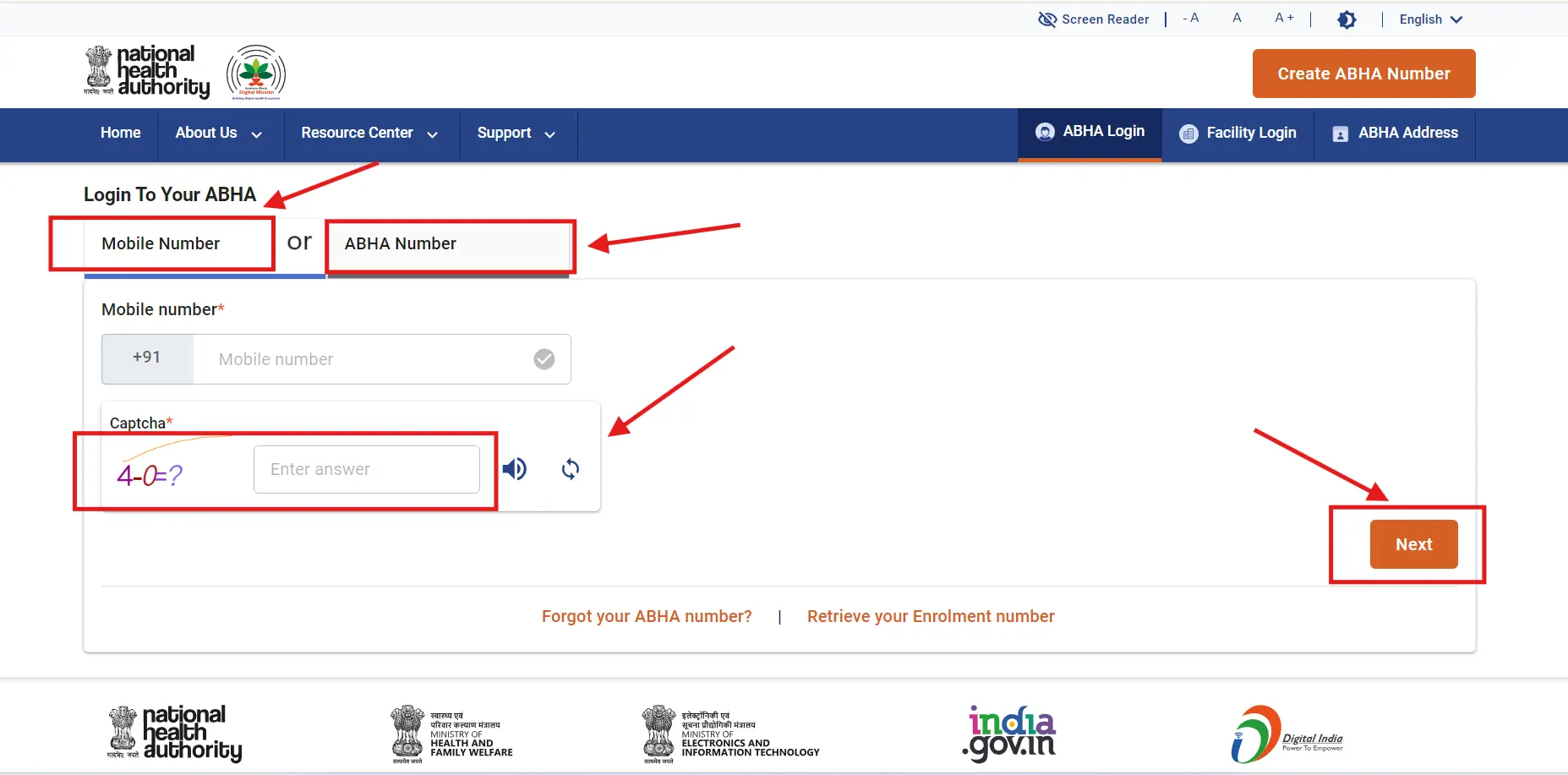
Step-4: Enter your details and complete the captcha, and Click Next Button.
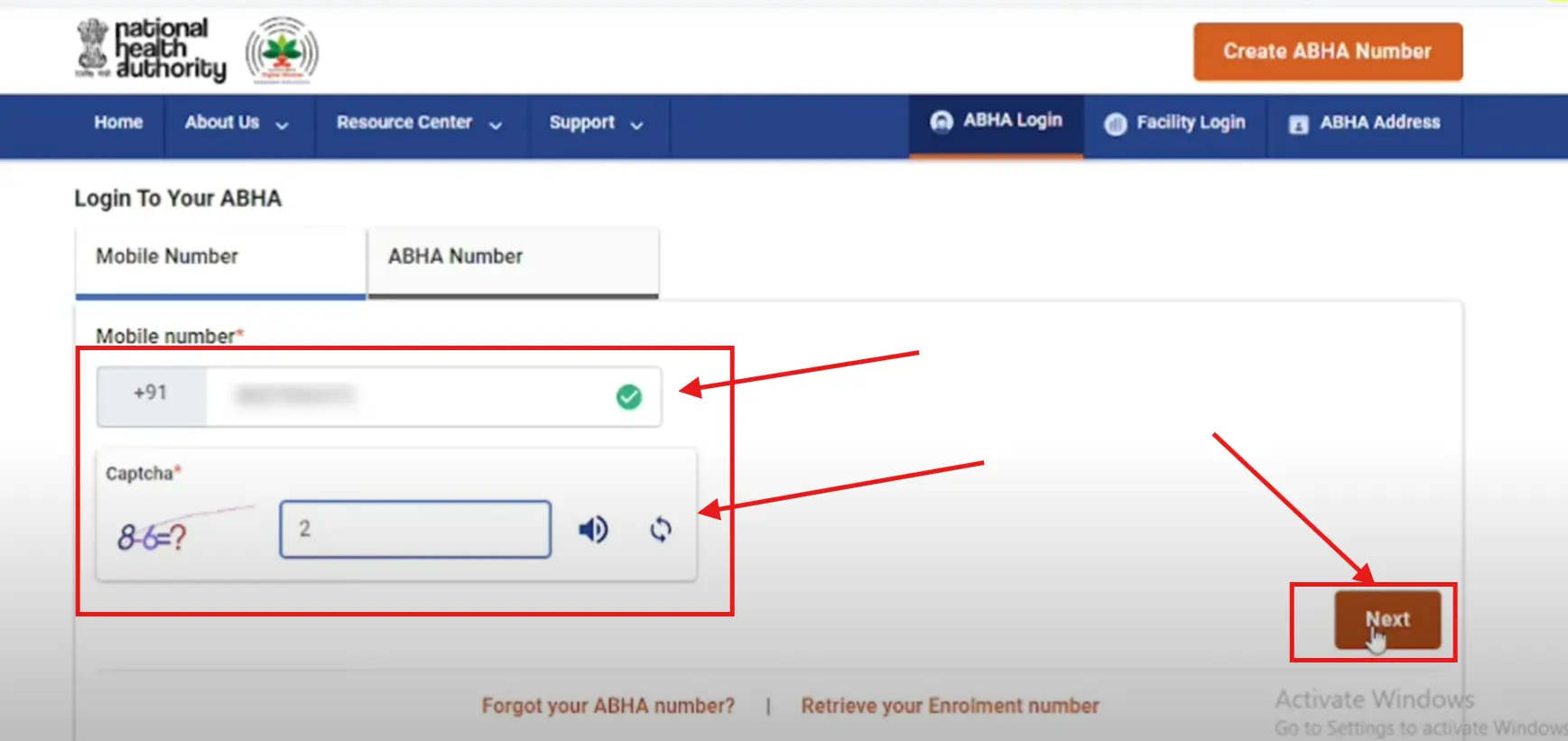
Step-5: Verify using OTP received on your mobile and Click Next Button then Access your dashboard.

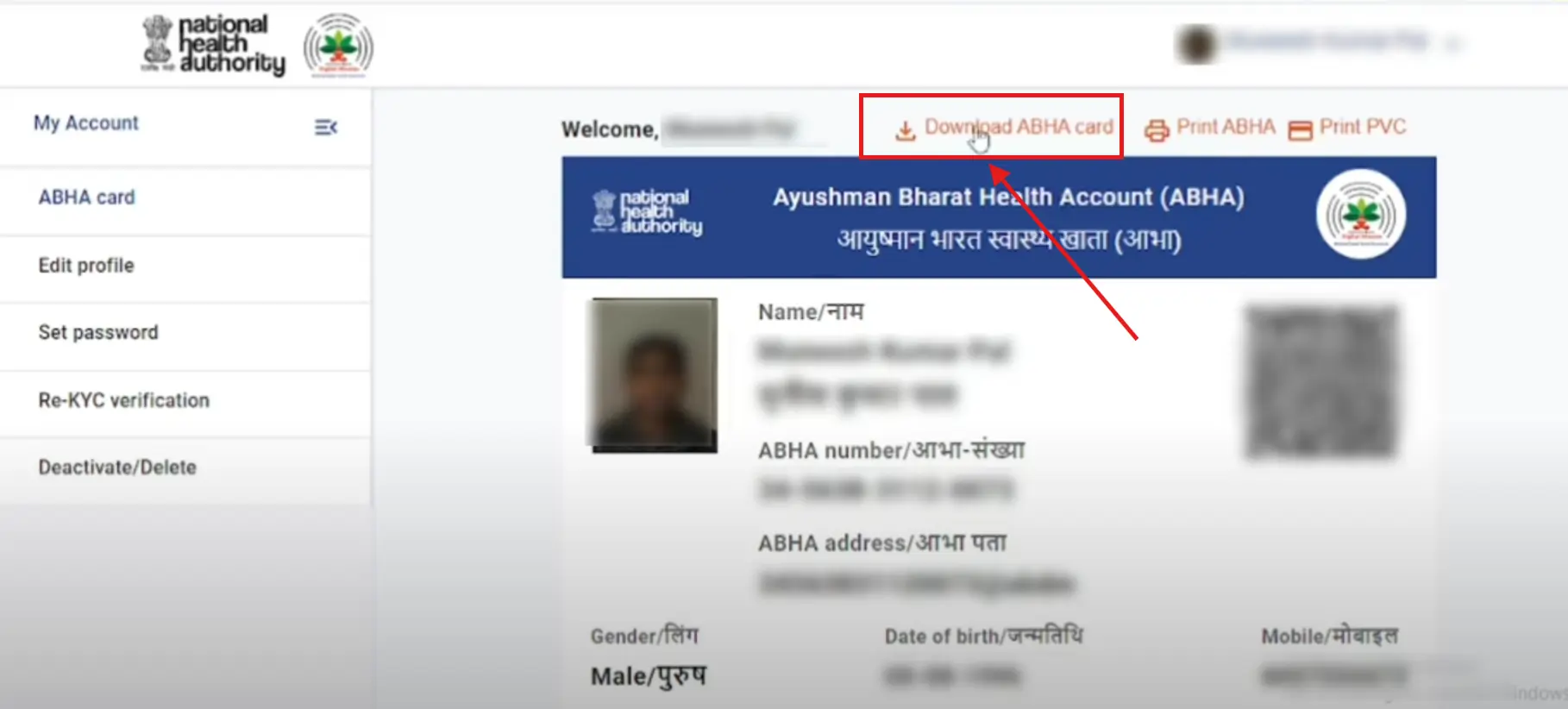
Step-6: Download or print your ABHA Card PDF
2- Download From ABHA App (Android & iOS)
If you prefer using your smartphone, the ABHA app provides a convenient way to access and download your card anytime.
Steps:
- Download and install the ABHA App from Play Store or App Store
- Open the app and tap on “Login”
- Enter your mobile number or ABHA ID
- Verify using OTP
- Go to your profile/dashboard
- Tap on “Download ABHA Card”
- Save the PDF on your device
3- Download From DigiLocker
DigiLocker allows you to securely access and store your ABHA Card along with other official documents.
Steps:
- Open DigiLocker website or app
- Sign in using your Aadhaar or mobile number
- Go to the “Search Documents” section
- Search for ABHA Card
- Link your account if required
- Fetch your ABHA Card
- Download the PDF
4- Download From UMANG App
UMANG is a government service app that also provides access to ABHA services.
Steps:
- Install and open the UMANG App
- Register or log in using your mobile number
- Search for “ABHA” in the services section
- Select ABHA services
- Enter required details
- Verify using OTP
- Download your ABHA Card PDF
How to Download ABHA Card Using Aadhaar Number
If you prefer to use your Aadhaar for verification, this method is one of the fastest and most commonly used ways to download your ABHA Card.
Steps:
- Visit the official ABHA portal
- Click on “Login”
- Select Aadhaar-based login
- Enter your Aadhaar number
- Verify using OTP
- Access your dashboard
- Download your ABHA Health Card PDF
This method ensures quick verification and secure access to your health records.
ABHA Card Not Downloading? Common Problems & Fixes
Sometimes users face issues while downloading their ABHA Card. Understanding these problems and their solutions can help you avoid delays and complete the process smoothly.
- OTP Not Received: Check your network connection and wait for a few minutes. You can also use the “Resend OTP” option.
- Login Failed: Ensure that you are entering the correct mobile number or ABHA ID. Clear your browser cache if needed.
- Server Error: This usually happens during peak hours. Try again after some time or use a different browser.
- Incorrect Details: Double-check your Aadhaar or registered mobile number to ensure accuracy.
How to Use ABHA Card in Hospitals
The ABHA Card is designed to simplify your hospital experience. It helps reduce paperwork and allows faster access to your medical history.
At the hospital:
- Share your ABHA number at the registration desk
- Scan the QR code if available
- Give consent to access your health records
- Your medical data gets linked automatically
This makes the treatment process faster and more efficient.
When Should You Use ABHA Card?
Many users create an ABHA Card but are unsure when it is actually useful. Knowing the right situations can help you take full advantage of your ABHA Health ID.
You should use your ABHA Card in the following cases:
- During hospital visits for faster registration
- While consulting a new doctor and sharing medical history
- For storing lab reports, prescriptions, and health records
- When accessing healthcare services across different hospitals
Using ABHA Card reduces paperwork and makes the healthcare process faster and more efficient.
Difference Between ABHA Card and Ayushman Bharat Card
Many users confuse ABHA Card with Ayushman Bharat Card, but both serve different purposes. Understanding the difference can help you use them correctly.
| Feature | ABHA Card | Ayushman Bharat Card |
|---|---|---|
| Purpose | Digital Health ID | Health Insurance Scheme |
| Benefit | Stores medical records | Free treatment up to ₹5 lakh |
| Usage | Data access & sharing | Hospital treatment |
| ID Type | 14-digit unique number | Scheme-based ID |
Both are part of India’s healthcare system but are used for different functions.
Difference Between ABHA Number and ABHA Address
Many users are confused between ABHA Number and ABHA Address. Knowing the difference helps in proper usage.
- ABHA Number:
A unique 14-digit identification number assigned to each user. - ABHA Address:
A username-like ID (e.g., name@abha) used for login and sharing data.
In simple terms:
- 👉 ABHA Number = Identity
- 👉 ABHA Address = Login & communication
Is ABHA Card Safe?
Yes, ABHA Card is designed with strong privacy and security features to protect your personal health data.
Key safety features include:
- Your data is shared only with your consent
- No hospital or doctor can access records without permission
- You have full control over your health information
- Data is stored securely under government systems
This ensures that your medical information remains private and protected.
Common Mistakes to Avoid
Many users face issues due to small mistakes while creating or using ABHA Card. Avoiding these can save time and prevent errors.
Common mistakes include:
- Entering incorrect Aadhaar or mobile number
- Using a different mobile number than registered
- Not completing OTP verification properly
- Forgetting to save ABHA number after creation
Always double-check your details to avoid login or download issues.
Is ABHA Card Mandatory?
ABHA Card is not mandatory for all citizens at present.
However, it is highly recommended because:
- It helps in managing digital health records
- Makes hospital registration faster
- Allows easy sharing of medical history
In the future, ABHA may become more widely used across healthcare services.
Benefits of ABHA Card
The ABHA Health Card offers several important benefits:
- Digital Health Records: Store all your medical history securely in one place
- Privacy & Security: Your data is protected and shared only with your consent
- Easy Access: Share records with doctors and hospitals instantly
- Personal Health Record (PHR): Manage and track your health information anytime
- Seamless Healthcare Services: Connect with verified healthcare providers
How to Create ABHA Card for Family or Child
If you want to create an ABHA Card for your child or family member, the process is simple and can be done online.
Steps:
- Visit the official ABHA portal
- Select “Create ABHA”
- Enter details of the family member
- Verify using OTP
- Generate ABHA ID
This is especially useful for managing family health records in one place.
Eligibility for ABHA Card
To create an ABHA Card, you must meet the following criteria:
- Must be an Indian citizen
- Must have valid identification (such as Aadhaar or Driving License)
- A mobile number is required for OTP verification
Required Documents for ABHA Card
You may need the following documents for ABHA registration:
- Aadhaar Card
- Driving License
- Mobile Number
ABHA Card Registration – Apply Online
If you have not created your ABHA ID yet, you can register online easily through the official portal. You can create your ABHA account using Aadhaar and a mobile number in just a few steps. Once registered, you can access and download your ABHA Health Card anytime.
👉 Use the registration option above to create your ABHA ID.
ABHA Contact Details
| National Health Authority (NHA) 9th Floor, Tower-1, Jeevan Bharati Building Connaught Place, New Delhi – 110001 Toll-Free Number: 1800-11-4477 Email: abdm[at]nha[dot]gov[dot]in |
Frequently Asked Questions (FAQs)
How can I download my ABHA Card?
You can download your ABHA Card by visiting the official ABHA portal, logging in with your mobile number or ABHA ID, and downloading the PDF from your dashboard.
Is ABHA Card free?
Yes, creating and downloading an ABHA Health Card is completely free for all Indian citizens.
What is ABHA Health Card PDF?
It is a digital version of your ABHA Card that contains your unique health ID and can be downloaded or printed anytime.
Can I download ABHA Card without Aadhaar?
Yes, you can create and download your ABHA Card using other valid ID options like a driving license.